FlowG · Free, open-source log management

Stop chasing logs.
Start solving problems.

An alert fires. The clues are scattered across your services.
FlowG brings your logs together, makes them useful, and helps you find the events you need to investigate.

Self-hosted · MIT licensed · Already used in production

Cut through the noise

Filter and transform logs as they arrive.

Find the relevant events

Search your logs in one place.

Keep your existing tools

Forward useful logs to your stack.

01 / Prepare your logs

Make sense of logs.
Before an incident.

Different formats. Repeated noise. Missing context. When every service logs differently, even a simple question takes work.

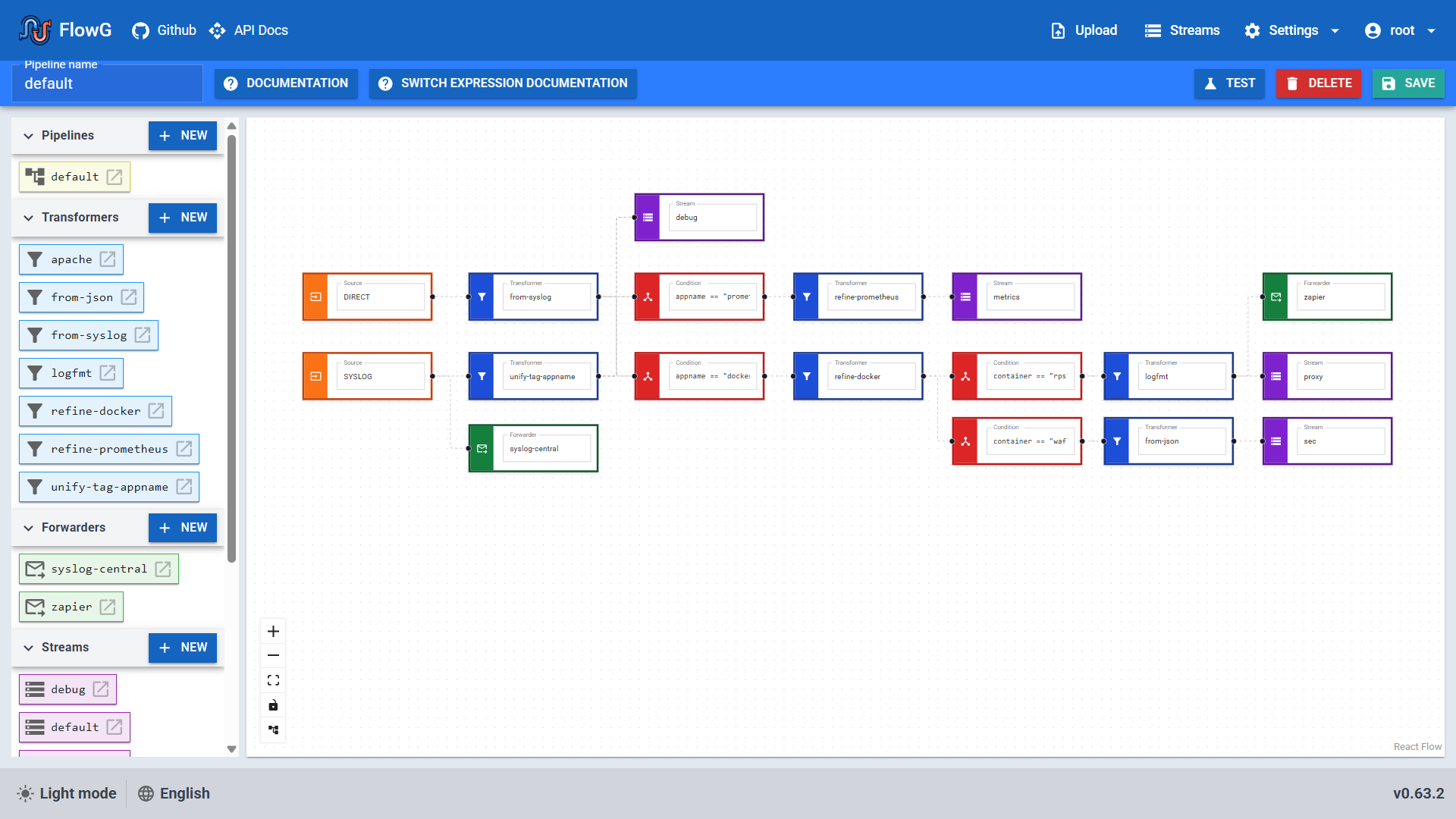
Build a visual pipeline in FlowG to turn incoming events into logs you can actually work with.

  • Filter the noise out of your streams
  • Parse and enrich events with VRL
  • Route logs to the right destination
Visual pipeline editorFlowG
FlowG visual editor with connected log sources, transformations, and destinations
The FlowG pipeline editor — your processing logic, in one view.

02 / Investigate with context

Find the events
behind the incident.

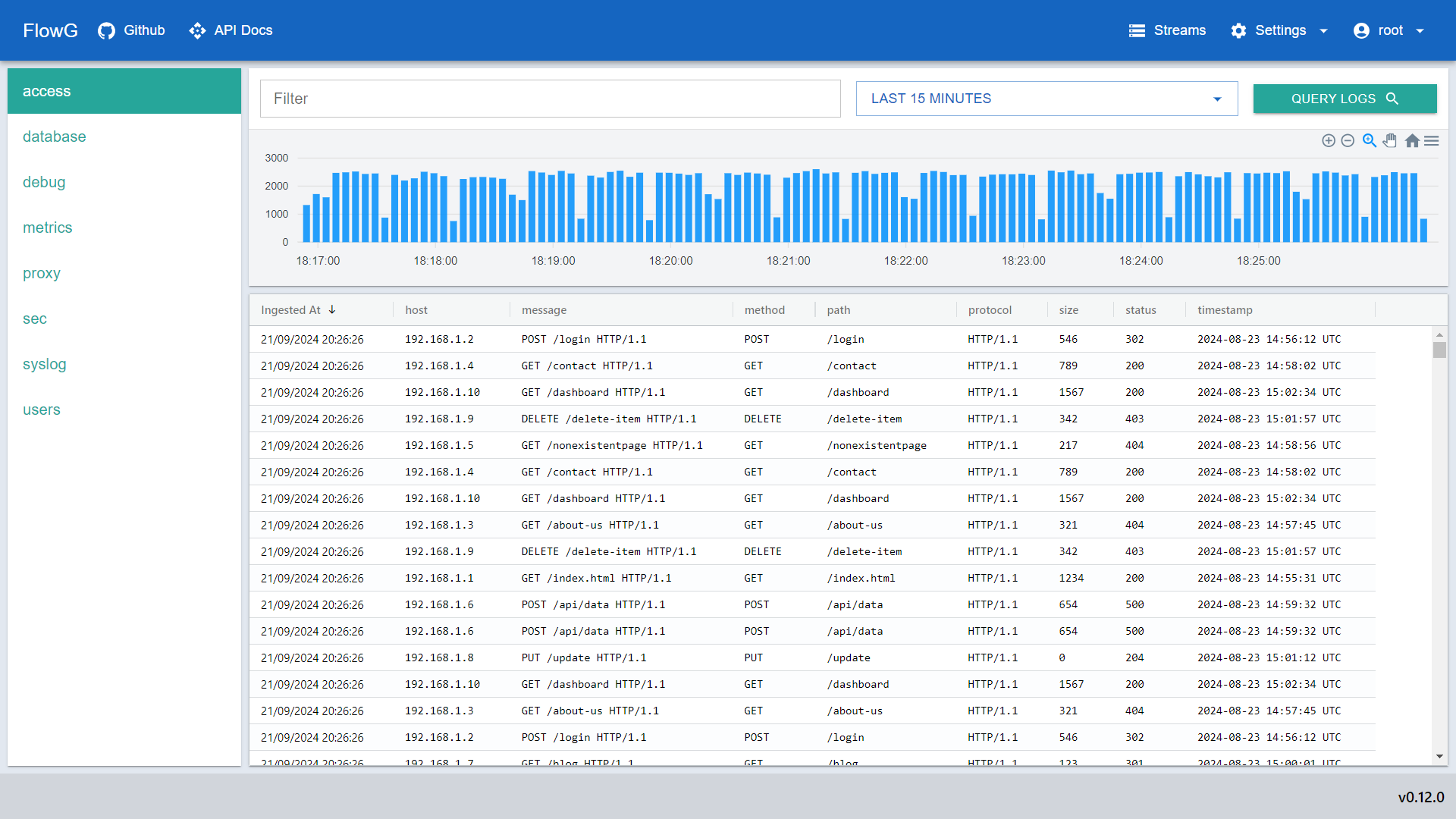
When something breaks, you need the relevant events in front of you. Query your streams and inspect structured logs directly in FlowG.

Your log formats can evolve along with your applications. No predefined schemas to keep in sync.

See it in the live demo
Log explorerFlowG
FlowG log explorer showing a query and the matching structured log records
The FlowG log explorer — search your streams and inspect each event.

Collect. Process. Forward.
FlowG integrates into your existing stack.

  1. 01
    ClassifyApply your own rules to categorize logs.
  2. 02
    FilterDrop unwanted logs before storage.
  3. 03
    TransformParse messages into structured fields.
  4. 04
    EnrichAdd context with extra fields.
  5. 05
    RouteStore in FlowG or forward to your stack.
  • logo-elastic-horizontal-color
  • HTTP
  • Syslog

Open source, from the start

Open source.
Under your control.

FlowG is free, open-source software under the MIT license. Run it on your infrastructure, inspect the code, and adapt it to your needs.

Explore FlowG on GitHub
  • A complete platform you can run today

    Collect, process, store, and explore your logs with self-hosted FlowG.

  • Control where your logs live

    Choose your own infrastructure and keep your log management in your hands.

  • Commercial offerings are optional

    You don’t need a SaaS subscription, MCP, or an LLM to use FlowG.

For what comes next

Need a different way to work?

Keep control of your infrastructure, hand off the hosting, or bring your LLM into the investigation. Get the help that fits your team.

FlowG On Premise

CONSULTANCY ON YOUR INFRASTRUCTURE

Your infrastructure.
Our team.

Hire us to audit, advise, install, manage, and maintain FlowG in your environment.

  • Keep sensitive logs on infrastructure you control.
  • Get to production without figuring it all out alone.
  • Take maintenance and troubleshooting off your team’s shoulders.

How we helpAudits · Advice · Installation · Maintenance · Support

Explore On Premise

Start with a pilot. Scope and pricing agreed with you.

FlowG SaaS

WORK IN PROGRESS

Your logs.
We handle hosting.

A managed FlowG is in the works. One less service for you to run.

  • Stop provisioning servers just to manage your logs.
  • Hand off upgrades and platform monitoring.
  • Get expert help when you’re stuck.

What’s plannedHosting · Upgrades · Monitoring · Support

Discover FlowG SaaS

Planned managed service based on open-source FlowG.

FlowG MCP

AVAILABLE · COMMERCIAL MCP SERVER

Your LLM.
Your logs, connected.

Let approved AI assistants search your FlowG log streams, read-only.

  • Stop copying log snippets into chats.
  • Answers grounded in your actual logs.
  • Connect your LLM without tackling the integration alone.

How we helpLicenses · Audits · LLM integration · Maintenance · Support

Explore FlowG MCP

Proprietary MCP server. Licensing and services scoped with you.

Your next step

Start with one pipeline.
Be ready for the next incident.

Connect a log source, build your first pipeline, and explore the events. Get started with the docs, or take a look around the live demo.

Free and open source. Need help finding the right fit? Talk to the team.